





Request A Reward Voucher
How Do I Request a Voucher for The My Chevrolet Rewards Program?
Step-by-step instructions on how to request your voucher...

Navigate to the My Rewards website at mychevroletrewards.com and log in. Your total points will appear at the top of the screen.
Click the Redeem Points tab. Here you will see the different ways in which you can use your points and the date by which you must earn and redeem them.
Once you’ve found the voucher you would like to request, click Learn More & Redeem.
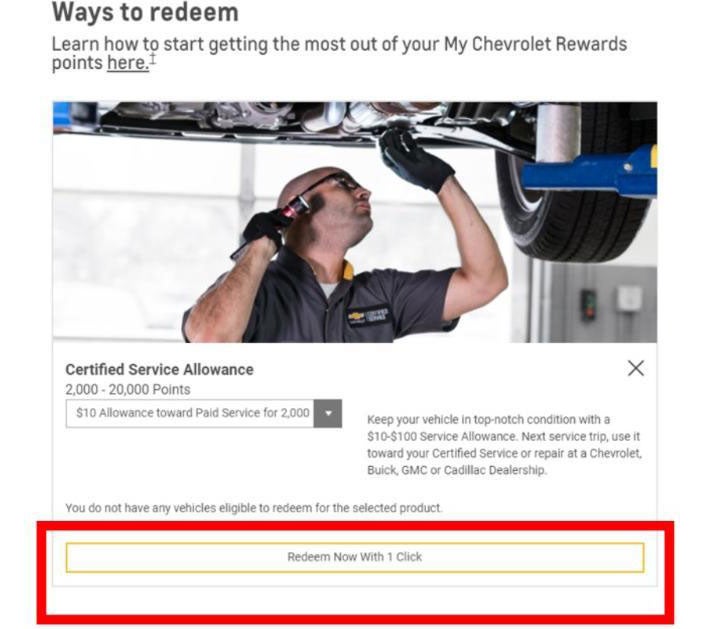
A page will load with more information about the voucher. Click Redeem with 1 Click.
(Note: Once the Member clicks, they will be unable to cancel the transaction to keep their points.)
Once you have redeemed the voucher, a new page will load with the voucher confirmation.
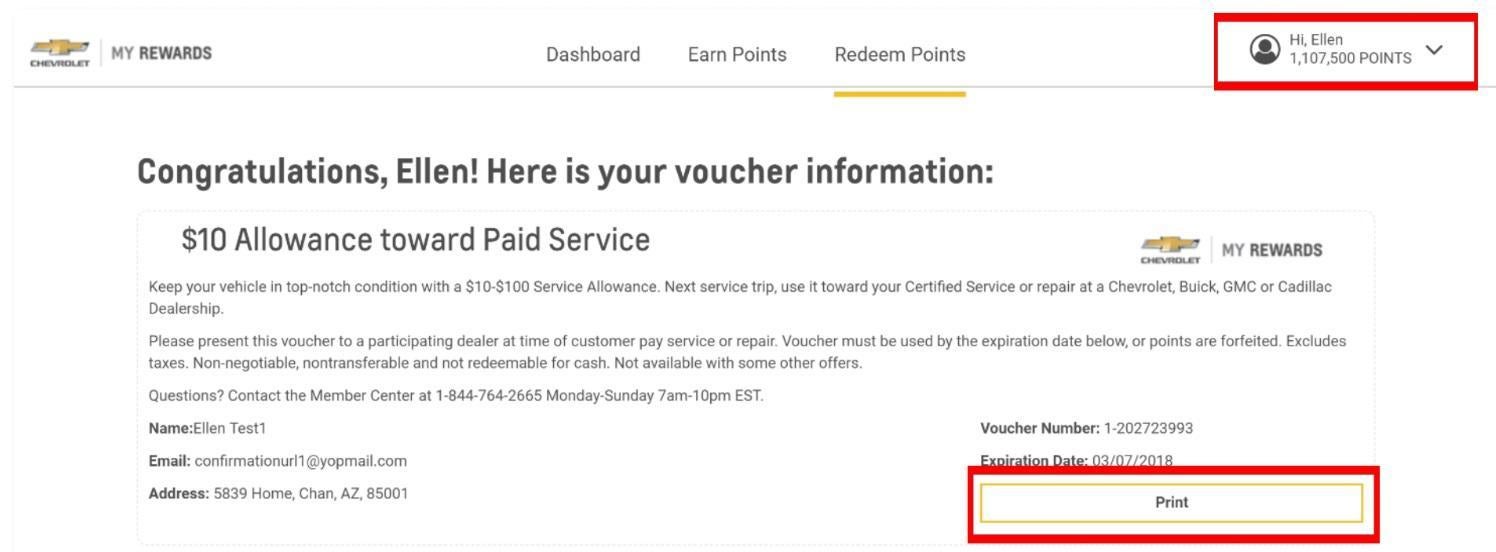
Information about your voucher will load. Print this information and bring it into Whisler Chevrolet Company at the time of your service for redemption. Vouchers must be used on or before the expiration date printed on the voucher.
Also note that the total amount of points in the top right-hand corner of the page will have changed.
Whisler Chevrolet Company
2200 Foothill Blvd, Rock Springs, WY 82901
Contact UsHours
| Monday | 8:00AM - 6:00PM |
| Tuesday | 8:00AM - 6:00PM |
| Wednesday | 8:00AM - 6:00PM |
| Thursday | 8:00AM - 6:00PM |
| Friday | 8:00AM - 6:00PM |
| Saturday | 9:00AM - 5:00PM |
| Sunday | Closed |
| Monday | 8:00AM - 6:00PM |
| Tuesday | 8:00AM - 6:00PM |
| Wednesday | 8:00AM - 6:00PM |
| Thursday | 8:00AM - 6:00PM |
| Friday | 8:00AM - 6:00PM |
| Saturday | Closed |
| Sunday | Closed |
| Monday | 8:00AM - 6:00PM |
| Tuesday | 8:00AM - 6:00PM |
| Wednesday | 8:00AM - 6:00PM |
| Thursday | 8:00AM - 6:00PM |
| Friday | 8:00AM - 6:00PM |
| Saturday | Closed |
| Sunday | Closed |